SharePoint group members management
The action is used to edit members of a SharePoint group.
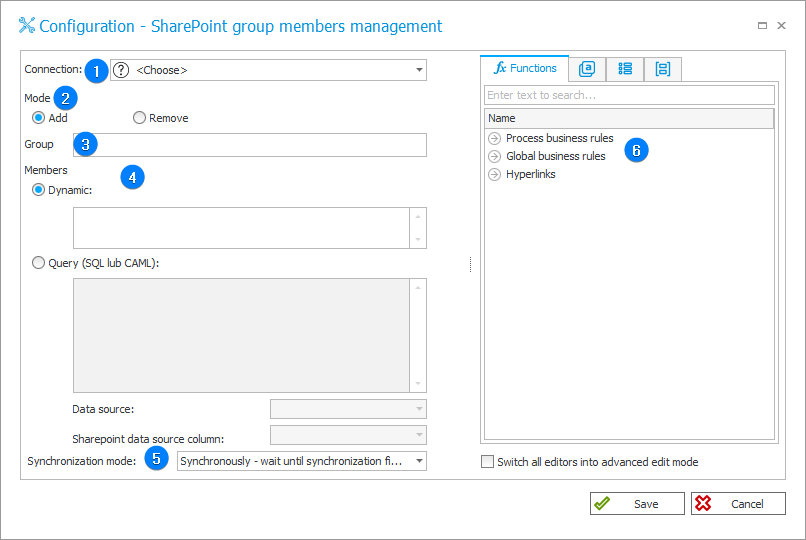
1. Connection
Specify the SharePoint site collection on which the action will be executed.
The Default connection is only available for actions created in earlier versions of the system. For newly created actions, this connection is unavailable.
2. Mode
Select the action's operating mode – it is possible to Add or Remove user to/from SharePoint group. For each time the action is triggered, the change will be made to one user.
3. Group
Choose the SharePoint group. The group details can be entered manually (statically) or dynamically (using Variables editor).
Enter the group details in the format ID#Full group name, for example, "45#SharePoint Group 2023".
4. Members
Group members can also be selected either statically or dynamically (as in the case of selecting Group), or via SQL/CAML query according to the filters and rules specified therein.
It is possible to select the Data source in the context of which the query will be executed.
By using SQL or CAML query it is possible to add/remove large numbers of users at once to/from a selected group.
5. Synchronization mode
After updating user or group data, it is necessary to carry out an independent synchronization operation. Data synchronization may take up to a few seconds, and the user’s data will not be available in the system until it is complete.
Available synchronization modes:
- Synchronously – wait until synchronization finished – the action will be considered complete after user data is synchronized. It is recommended to use this mode when there are sequential actions after this one that will need the updated data.
This mode will cause the user data to be added or updated outside of the transaction in which a sequence of actions are executed. If one of the sequential actions in the transaction returns an error, the withdrawal of the transaction will not cause user data changes to be reversed. Updated user data will remain in the system. - Asynchronously – do not wait until synchronization finished – the action will invoke a user synchronization but will not wait for it to complete. The synchronization will be carried out as the last operation after the transaction completes successfully. If one of the sequential actions in the transaction returns an error, the withdrawal of the transaction will also cause user data to not be entered into the system.
6. Variables editor
Dynamically generated tree containing all variables that may be used in the current location of Designer Studio. Information on how to use variables in WEBCON, as well as a list of variables can be found in the dedicated section.
For more details on the action, see the article SharePoint Online – privileges on our technical blog.